A walk-through How to import or migrate your old Electrum BTC wallet into Sparrow Wallet

 |
|
 |
|
 |
|
 |
|
 |
|
 |
|
 |
|
 |
|
Originally posted on Substack on Feb 20, 2022
Updated here on Dec 20, 2024
Many users are asking me about how to use Electrum seed BIP39 into another wallet apps. So now I would explain it, how I do it.
So, let's consider that you create your cold wallets, using my previous guides or you simply have an old BIP39 seed and now you want to use it in Sparrow wallet.
There are two methods to import a previously created Bitcoin wallet in Electrum, into Sparrow app:
- The simple one - using the Electrum backup wallet file.
- The advanced one - convert BIP39 seed into BIP84 with its derivation path.
Resources used:
- Electrum wallet: download page and documentation page
- Sparrow wallet: download page and documentation page
- Cryptography Tools page
A. Import Electrum wallet file into Sparrow
- Once you have the Electrum wallet created and all works fine, go to menu File - Save backup. It will ask you for location where to save it, click on the box and select where. Keep it safe!
- This file is encrypted! So you will have to use your Electrum password to open/use it in Sparrow. Is that password that you put it (twice) when you created the Electrum wallet. It is NOT the additional passphrase, in case you used one together with the 12 words seed. Is the password used to open your Electrum wallet.
- Open Sparrow app. Select import wallet and select Electrum. Browse for the previous file saved in point 1. It will ask you to put the wallet password.
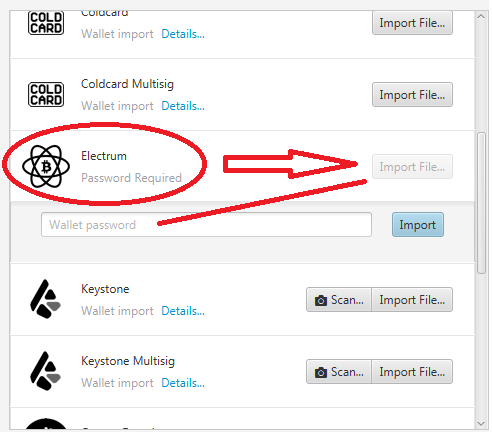
Just follow the steps and Sparrow will start importing all previous UTXOs, transactions etc. You will be asked to set a password for that wallet. That is also encrypting local wallet file and later can be saved in a safe location (password manager - KeePass), use the menu File - Export option.
Done!
B. Advanced seed conversion from BIP39 to BIP84
- You have the 12 words BIP39 seed and for verifying that you convert it correctly is better to have at hand some of the first BTC addresses generated, derivation path, MPK (master public key), Base private key.
- Go to https://guggero.github.io/cryptography-toolkit/#!/hd-wallet (you can save the page and use it offline, for safety).
- Put your 12 words seed BIP39 from Electrum
- Select BIP39 and in HD node root key select BTC native segwit BIP84 (or the format you have it in Electrum generated, legacy or segwit). In the next screen block you will see the conversion in BIP84
- Select coin type native segwit. Save that derivation path and all details shown, in your password manager. Now, copy that "Derived key base58" output.
- Open Sparrow app. Select from menu File - New wallet. Choose a name.
- Then in the next screen you can paste the derived key base58and import it.
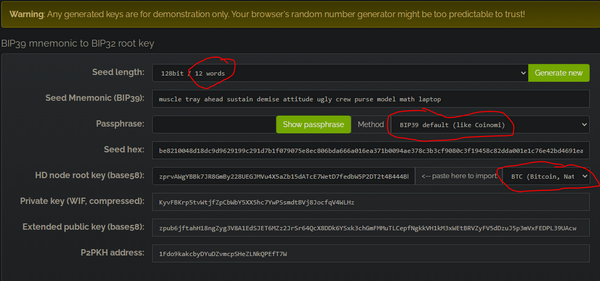
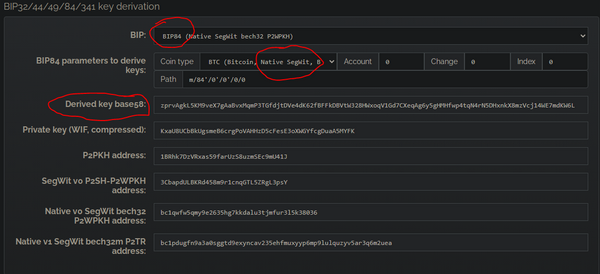
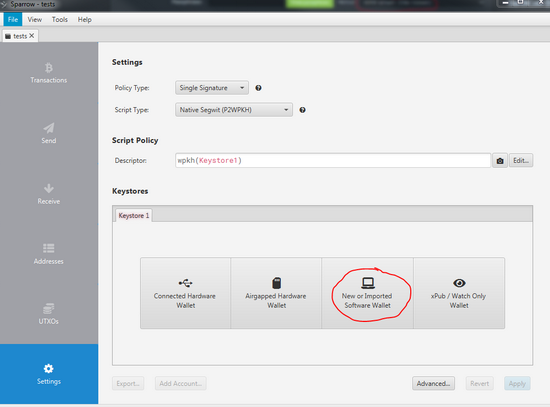
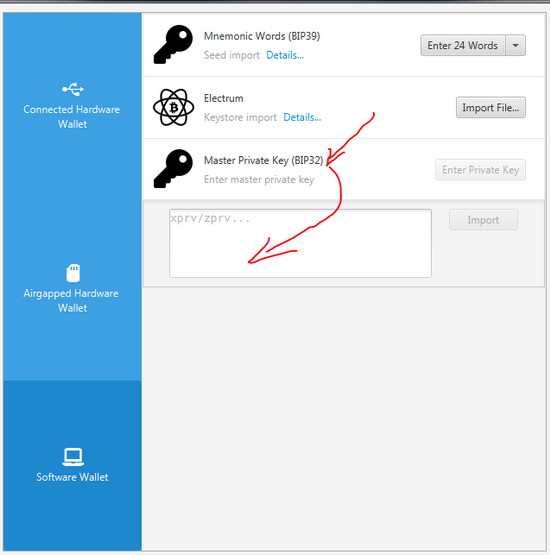
Follow the screens and you will see how is importing the previous UTXOs and transactions. No you can go and verify them, it should be the same BTC addresses from previous segwit native (bech32) Electrum wallet.
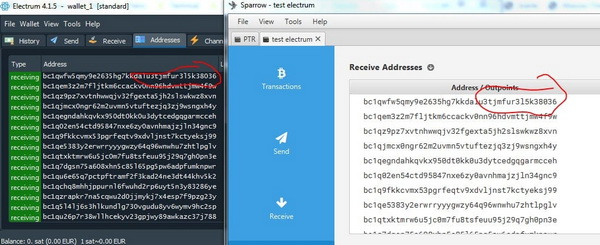
Done! Now you have imported your previously Electrum bech32 wallet into Sparrow.
C. Or migrate to Bitcoin-Safe
Bitcoin-Safe is a modern, open-source desktop Bitcoin wallet built for beginners and power users alike. It supports single-sig and multisig, all major hardware wallets (Trezor, Ledger, ColdCard, Jade, BitBox, Foundation Passport), coin control, UTXO labeling, Taproot (P2TR) and connects to your own Electrum server or Bitcoin Core node. Think of it as a cleaner, more beginner-friendly Sparrow with a built-in multisig wizard.
If you want a modern upgrade from Electrum and do not want to deal with Sparrow's complexity, Bitcoin-Safe is an excellent destination.
Method 1 – Import your Electrum seed (simple)
- Download and install Bitcoin-Safe for your OS (Windows, Mac, Linux).
- Open Bitcoin-Safe and start creating a new wallet.
- Select "Single-Signature wallet" and choose "Restore from seed words".
- Enter your 12 or 24-word BIP39 seed from Electrum.
- Choose the correct script type:
- Native SegWit (BIP84 / bech32) if your Electrum addresses started with
bc1q - Taproot (BIP86 / P2TR) if you want to upgrade right away to the newest address type
- Native SegWit (BIP84 / bech32) if your Electrum addresses started with
- Verify that the first few addresses shown match your old Electrum wallet. If they match, the import is correct.
- Set a strong password and save your wallet file in a safe location (KeePass or encrypted USB).
Done! Bitcoin-Safe will scan the blockchain and show all your previous UTXOs and transactions.
Method 2 – Import xpub/zpub as watch-only (advanced)
- In Electrum, go to Wallet menu → Information. Copy your Master Public Key (xpub or zpub).
- In Bitcoin-Safe, create a new wallet and choose "Watch-only".
- Paste the xpub/zpub. Bitcoin-Safe will derive all addresses and show your balance without ever exposing your private keys.
This is ideal if your private keys stay on a hardware wallet or offline system, and you only need to monitor balance and generate deposit addresses.
Bonus: Multisig with hardware wallets
Bitcoin-Safe has a dedicated multisig setup wizard. You can create a 2-of-3 multisig with hardware wallets directly from the GUI — no command line, no config files. This is where Bitcoin-Safe goes beyond Electrum and even Sparrow in ease of use.
My advice is, migrate all your old BIP39 HODL wallets to Taproot (P2TR) type of wallets. Read here the guide about that.