How to start using Zeus as a graduated LN wallet, as a new user, step by step
 |
|
 |
|
 |
|
 |
|
 |
|
 |
|
 |
|
 |
|
Updated Dec 15, 2025
Introduction
OK, I've seen a lot of demand for this kind of guide, many people contacted me and asking how to start with LN without using LN channels, because of various reasons.
And it blows my mind that people STILL don't know how to use Zeus, this very powerful mobile LN wallet, a pure LN wallet, with no bullshit, no hidden features, with a lot of options and functionalities. Inside you will find many links to other guides that you should read them.
This guide is for all those new bitcoin users that do not have too much knowledge about how to use LN nodes, liquidity, swaps etc terms that are not so known out there. I will try to make friendly as possible, but please pay attention to everything I say in this guide.
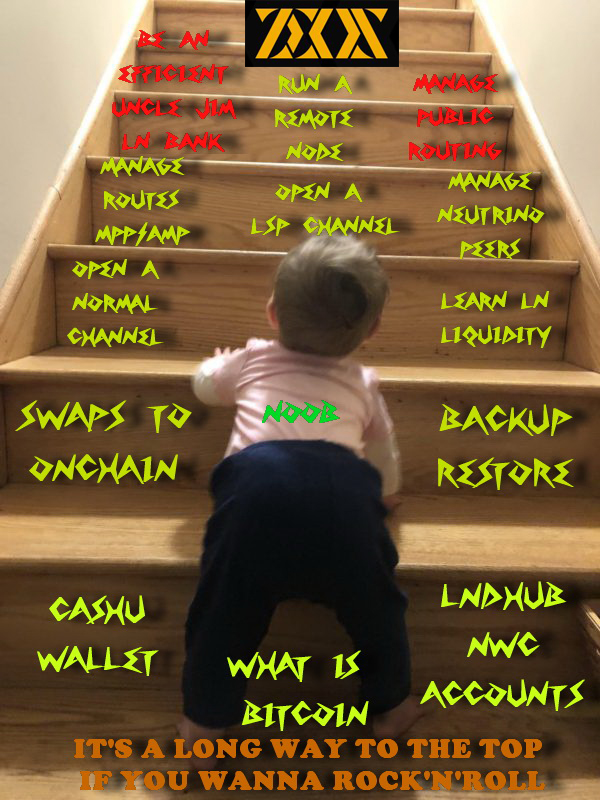
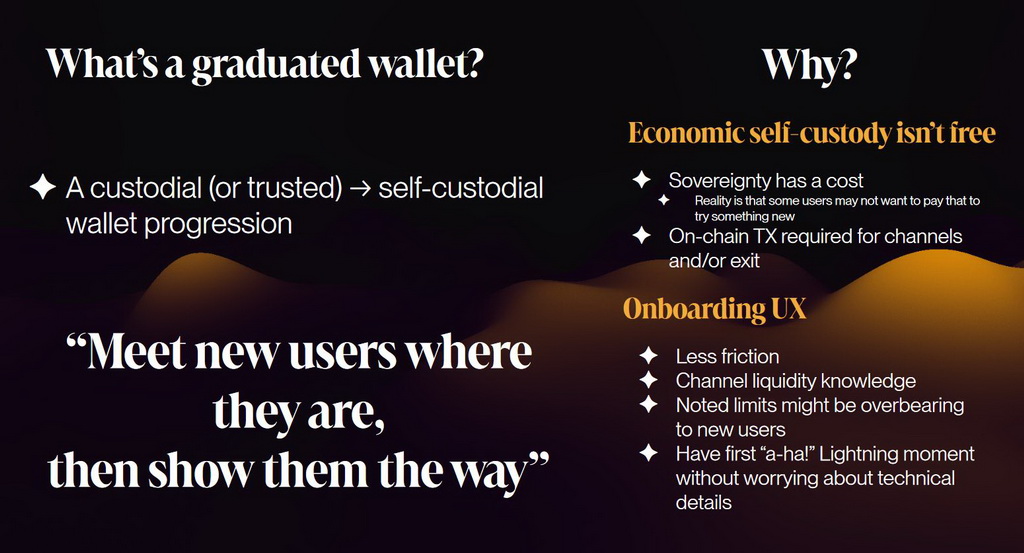
So what is a "graduated wallet"? As Evan Kaloudis presented at BTC++ conference (see bellow the full video) is a wallet with which you start from the bottom and climb to the top, slowly accumulating sats and opening channels when is needed and you feel comfortable to make a next step, up until the top of the knowledge ladder, to the highest level when you run a powerful remote node managed from Zeus.
So let's get started... my young padawans...
This graduated wallet guide have 3 main levels:
- Step One - Mortal - start with the basics and with a cashu wallet and/or NWC and lndhub accounts
- Step Two - God - move to Zeus self-custodial embedded node and open LN channels
- Step Three - Olympian - reach the highest level of the ladder, running your own remote node managed by Zeus -

STEP ONE - MORTAL LEVEL
Main caracteristics of this level:
- Custodial or trusted onboarding
- Lightning Address
- No LN channel management
- User can still have "a-ha!" moments discovering how LN works
- Wallet prompts user to upgrade to self-custody as balance grows
Option A - CASHU WALLET
You are a new Bitcoin user that have ZERO sats, no way to open a LN channel.
First thing, you should go and read some of my beginner guides about Bitcoin, to have at least a base knowledge about Bitcoin terms and concepts like onchain wallet, addresses, LN channels etc. - DarthCoin Bitcoin Beginnenr Guides
Ok so you know some Bitcoin basics, we do not enter in details here. Now, you want to receive and accumulate a certain amount of sats and then move them into an onchain wallet, cold wallet or whatever you like to do. Usually many people are buying sats from exchanges but they don't know how to withdraw them using LN.
What is Cashu? A new users will ask...
Cashu is a free and open-source Chaumian ecash protocol, built on Bitcoin, with good privacy properties. Is more like a token that carry sats, like a gift card loaded with sats, but secure and private.
But be aware, is still CUSTODIAL, meaning there is risk of the underlying custodian (the mint) stealing your funds.
More info about Cashu here: https://cashu.space
And Zeus have a wonderful and easy solution: an integrated cashu wallet. No LN channels, seed backup, receive straight away without any hidden fees, swaps integrated to onchain, friendly UI, multiple mints and... a great user support from Zeus team.
Here is a demo video how to start the cahu wallet in Zeus, please watch it with attention:
To keep in mind:
- the cashu wallet is supposed to be a temporary solution for the new user, an easy way to start accumulating. Do not use it forever as your main LN wallet! Is still custodial.
- once you receive a certain amount of sats that you are comfortable to move into your own custody onchain wallets, use the integrated swap service in Zeus (with multiple swap providers too) and move the sats out from cashu.
- cashu is also offering an extra level of privacy when you receive sats
- choose wisely your cashu mints when you start. In the video above it is mentioned that. Also you can check in more details the cashu mints ranking here: https://audit.8333.space and here https://bitcoinmints.com/
- you could use multiple mints too to spread the risk. Soon we will have also option to send from multi mints.
- you do not have to open a LN channel in order to make a swap to onchain. You can do the swap straight from the cashu wallet.
- optional you can create your LN address if you want to use it on nostr for zaps
- optional you can activate NWC service so your Zeus wallet can be used to send zaps on nostr. I've talk about this in a previous guide here. Practically with NWC (Nostr Wallet Connect) you create a secret string that communicate over nostr and be able to use your Zeus wallet in other online apps that support this protocol. It will be necessary to put your Zeus in persistent mode.
During this period, Zeus will guide you when is optimal to move the cashu balance and when you are ready to open your first LN channel.
REMINDER: Don't forget to make your seed backup !
The cashu wallet is linked to Zeus embedded node seed. So even that you do not use the embedded node with channels is still necessary to generate your cashu wallet backup. You can still use the Zeus embedded node onchain if you like. No problem at all with that to use it as a buffer zone, until you move a bigger amount of sats into another cold wallet.
Also this onchain wallet, if you want to have more control over it, you can import it into Sparrow desktop wallet. You have the instructions here
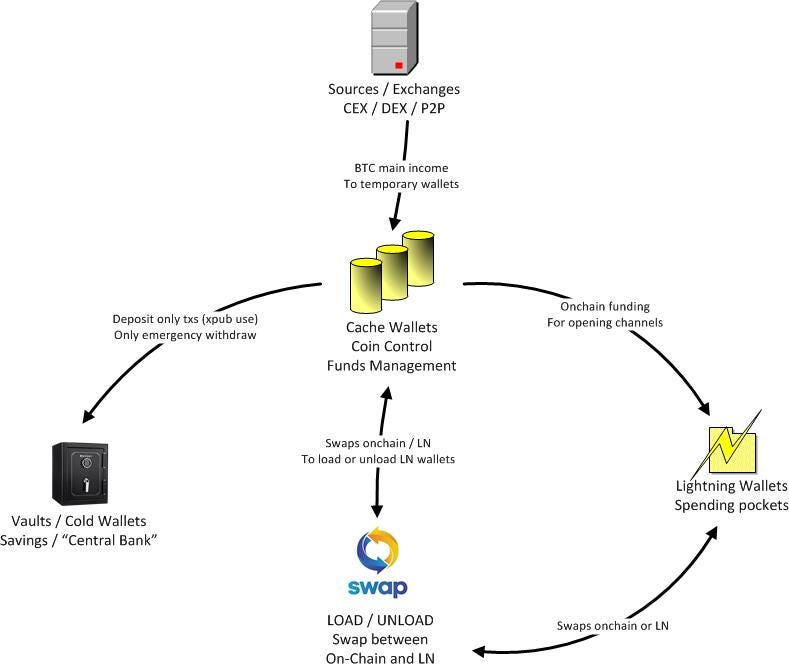
I've explained this 3 levels of stash in one of my previous guides here
Option B - NWC / lndhub accounts
If you do not want to use cashu wallet or just want to add another way to use Zeus without LN channels, you can use any NWC provider or lndhub accounts. Usually these are custodial, but if you have a friend running a LN bank for your local community, is another easy way to use Zeus.
These accounts do not need to run the embedded node ! Are totally independent and you can have as many you like.
If you start Zeus for the first time, you can choose to go straight to create account and select NWC (Nostr Wallet Connect) or lndhub interface, instead of embedded node or remote node. You will be prompted to insert the NWC string or lndhub URL for your accounts you want to use with Zeus.
To consult from where you could get a NWC account, please go to https://nwc.dev and read more.
My personal choice is to use a Rizful disposable node and setup a simple cloud node, with just a single channel.
Setup your Rizful node:
- go to Rizful Node in the cloud page and create a free anonymous account. Save all the information you get from starting your LN node: nodeID, LN address (can be personalized), login details, both NWC strings (receive only + send/receive string). They have extensive documentation here.
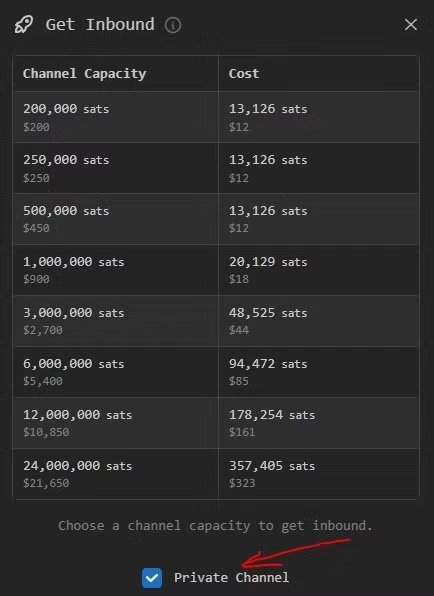
- buy your first inbound channel. Their documentation is very helpful and straight forward.
click on the "get inbound" button and select the channel size you need. Size it correctly! Calculate more or less how much you will be receiving during a certain period of time, depending of your activity. Let's say for 1 week you expect to receive aprox 500k sats. So you will buy a 500k sats channel for around 13k sats fee. The channel will be almost instant open and ready to be used.
Optional you can also open a channel with other LN nodes, but with funds from onchain wallet, but you will need to deposit first into your Rizful node onchain and from there opening the channel. Be aware, that will be "Outbound capacity" so you will not be able to receive until you start making some payment and drain a bit that channel. A LN channel is like a glass filled with water. You can have a full glass but also you an empty glass, depending on what do you need more. But as a merchant you should start with an empty glass because you start to receive more.
- generate your NWC strings. You can use NWC "receive only" or full access with "send/receive" depending how do you want to use it in Zeus.
- In the Zeus first screen, select "Advanced" and create a new connection using the NWC (Nostr Wallet Connect) option from the drop-down menu. Put a name to your wallet and optional an image.
- paste the "receive-only" or "send/receive" NWC string from Rizful node into the NWC URL field and save the wallet config.

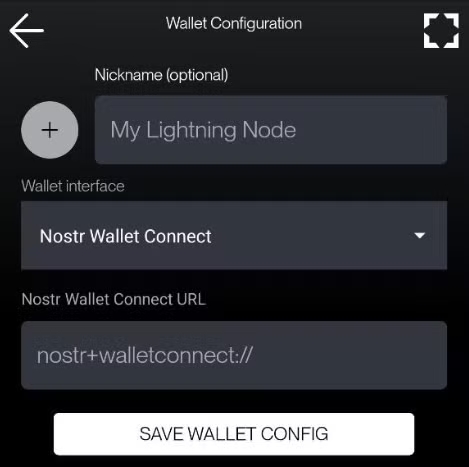
And done! Now you have a fully functional LN wallet into your Zeus using a remote LN node through NWC connection. You can accumulate into this Rizful inbound channel all the sats you desire and when you feel comfortable, make a swap to any of your own onchain wallets.
This option with a Rizful node is also a good decoy but also is good to having a 24/7 LN node ready, no need to sync anything on your Zeus. This is mainly recommended for those users from remote locations where neutrino sync is giving you troubles to sync. I've explained these aspects in another guide here.
So with a NWC or lndhub account you can avoid these kind of situations. But keep in mind that these accounts are still custodial !
SWAPS TO ONCHAIN
So we suppose you already received enough sats into your cashu or NWC accounts and now you want to move them from those custodial accounts into your own onchain wallets, for cache, holding or long time reserves.
The process is very simple, first thing prepare your onchain wallets:
- you can use the Zeus embedded node onchain wallet
- you can use any external onchain wallet, preferable using a desktop app like Sparrow, Electrum or Bitcoin-Safe for a better and safe management of your UTXOs and wallets.
Please read my previous guide about how to stash your Bitcoin on three levels: spending - cache / buffer zone - cold wallets / vaults. Inside of that guide you also find this example table of recommended size of these UTXOs is good to have in your onchain wallets. Please read that guide, is very important.
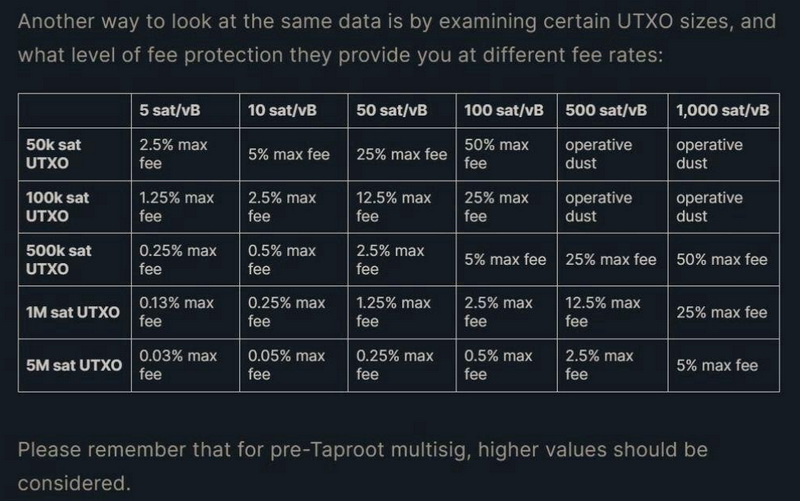
Then go to Zeus - Top left menu - Swaps
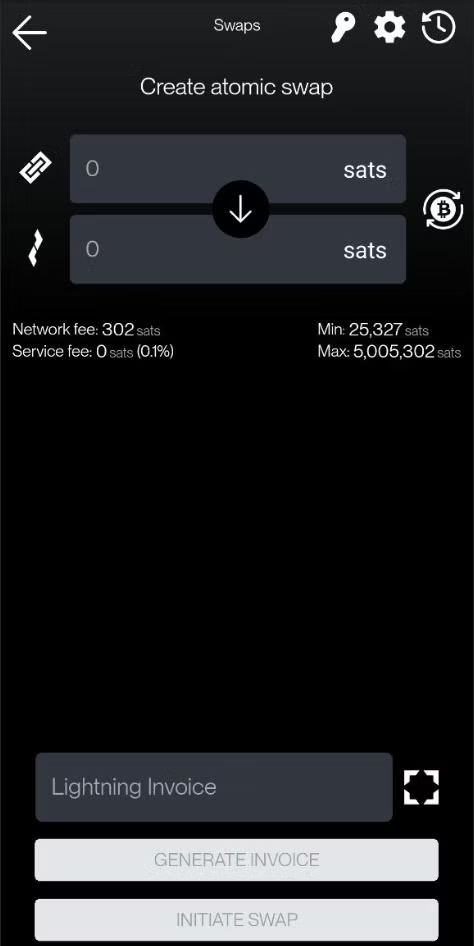
In this moment is better to save the unique swap keys Zeus is providing, in case the swap didn't fulfill it will be required. So go to the top right corner and click on the key. Save that key in a safe place, out of your device, in your password manager.
Also in the top corner you have the option wheel that can switch to another swap provider, default is Zeus, but there are also available others like: Boltz, SwapMarket, Eldamar or a custom one.
As you can see Zeus is offering multiple choice, is not a walled garden like others. All in the open.
Then, you are prompted to select the type of swap you want to do, by default is to refill an existing LN channel, but you can switch the swap by pressing the arrow between onchain and LN.
You will see that now is asking to provide a destination onchain address, that could be any of your internal or external onchain wallets.
Put the amount you want to swap, I suggest to not use all you have accumulated, just leave like 1% for possible fees and reserves, and then you will be prompted to pay a LN invoice, that you can pay it with your Zeus cashu or NWC account. It will take few moments to make the swap and done. Your sats will be confirmed in the designated onchain address you provided.
Now you are ready to repeat the accumulation and a next swap.
STEP TWO - GOD LEVEL
START WITH ZEUS EMBEDDED NODE
What does this mean?
- You run a self-custodial LN node in your mobile device
- REAL Lightning wallet, not any other bullshit
- This is the so called "Node in the phone"
- Likely leaning on LSP for channels, but you can open channels with any other peer node
- Gets to take Lightning address with them
- Proper LN channels management
- You can still have and use a cashu wallet as additional companion wallet
- Choose between 2 LN implementations: LND and LDK. Here you can read the small differences between them
I will not enter into too many details here, I already wrote several guides about this step. Please read them all and pay attention:
- Getting Started with Zeus LND Embedded Node
- Managing Private LN channels types - this is a very important guide to understand how to use specific types of channels
- Zeus Node - Advanced usage and tips and tricks
BACKUP AND RESTORE
Is good to practice this process and get comfortable with. Also for this process I wrote some specific guides:
MANAGE YOUR NEUTRINO PEERS AND A HEALTHY NODE #
Remember: Zeus is a LND node ! Is not just a simple wallet or custodial account.
That means it require to be well synced with the chain and LN graph in order to be able to use it properly. In the resources guides I've explained more details about how to manage the neutrino peers. Please read them.
Here I will give more heads up about how to keep healthy your Zeus node, because I still see people that do not understand some aspects.
- no blocks sync = LN node it doesn't start = no channels online = no onchain balance usable
- Zeus is using BIP157 / neutrino to sync the blocks headers, with compact block filters.
- Read more about Compact Block Filters here
- A good article about neutrino's privacy here
- There's NO NEED to use Zeus with Tor in order to sync. Tor is only adding more latency and can break the sync. Not even a VPN is necessary because also these could add more latency.
- Neutrino sync REQUIRE a good ping (low latency) in order to be able to sync fast. It doesn't matter if you locally have a high speed internet for downloading, but you have a shity ping to the neutrino peer. Remember that the ping is determined by the distance to the peer from your location. Adding more network layers and connection points will add more latency. That end up in failed sync.
- if you run a bitcoin node or a local friend is running it, you can connect to it to have a better ping. Here you have a guide about this aspect.
- always before you start using the Zeus node, configure your neutrino peers accordingly. See the Zeus docs FAQ page or my guides. It is very well explained there how to do it.
- Neutrino + client side path finding (Express Graph Sync locally) offer a very good privacy to run a private LN node. Do not complicate things with Tor. Tor is not offering any other privacy on top of these, only make things worse.
- Client-side path finding: ZEUS constructs users' lightning payment paths on their devices, so we don't know the final destinations of our users' payments, even when they're forwarded through our channels. Not only do we not want to know how you're using your money, but we're building things in a way that we can't. Not all wallets can say the same.
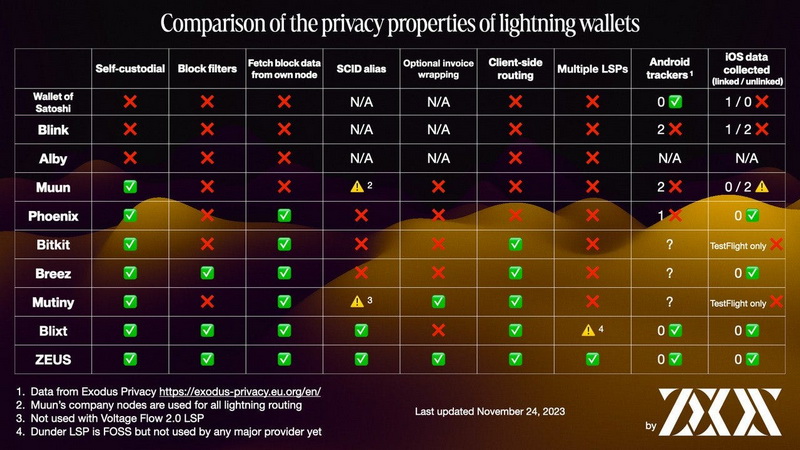
Another aspect to keep in mind: if you are using quite often Zeus during a day, you could put it into "Persistent mode". That means the LND service will run in background and will keep the sync alive and well, being ready to make/receive payments any time. This is necessary also if you want to start using Zeus with the new NWC sub-accounts. Is like keeping alive a LN node, only that is in your mobile.
If you do not use it so often during a day, but you still want to be ready, is better to sync it almost every day, even that you do not make any payments.
There's also a trick, if you do not make so often payments but want to keep it as most synced, activate in the embedded node - express graph sync - "enable EGS" and "reset EGS at startup". These 2 options will keep the LN graph updated, offering you the best payments paths, that are constructed locally by your own node, not by any LSP you have channels with.
Another trick - how to keep sane your Zeus data.
In time, the channels DB file get bigger, for more you use it, more updates is doing in the DB. So is a good practice to compact this database.
Go to embedded node - troubleshooting - activate compact database. It will ask to restart. Do it and wait, it will take few moments.
Then you can consult in app info and see how much data was reduced. Is good to do this weekly or monthly, not daily. Reducing the DB size is also helping to use of battery.
Another trick, also in troubleshooting section is the option "delete neutrino files". Use that option ONLY if you notice some weird behavior in syncing even that you have good ping with your peers. Sometimes if you do not sync for a long time period, these files get corrupted or obsolete and is better to just wipe them and start over the sync. In general are like 400-500MB (are only the headers of the blocks).
You can safely delete them with the option from troubleshooting section and restart Zeus. BE PATIENT! It will start syncing from zero your node and also rescan the wallet. So better put it first in "persistent mode" and wait. Usually with a good neutrino peer is not taking more than 5-10 min.
STEP THREE - OLYMPIAN LEVEL
RUN YOUR REMOTE NODE WITH ZEUS
Main aspects of this level:
- Now you became a self-sovereign node runner
- The LN Node can be at home or hosted remotely
- Full knowledge of channel liquidity
- Manage your own LN channels and liquidity
Now is time for serious business. This is for advanced users, when they already accumulated enough sats and knowledge about managing LN liquidity.
You start installing a node machine at home or in the cloud on a VPS machine and then connect your Zeus to it through the specific connections. Read more here.
I also wrote several guides about running remote nodes. I only want to remind you some aspects here:
- there are two types of nodes - public routing and private (non-routing). Choose wisely, only for personal use but with larger channels, is enough a private node. In case you want to became a router, then you need a public one, but with large capital and reliability.
- you can run a full node with all bitcoin chain sync but also you can run a LND node in neutrino node, that can run very easily on any cheap VPS because is not consuming a lot of space like a full bitcoin node.
- if you run a public routing node, please DO NOT run it on a shity RPi behind Tor. Public nodes MUST be best reliable and on clearnet for best performance. If you cannot use clearnet with a home node, please consider reading this excellent guide how to make a wireguard VPN tunnel with any VPS.
- Here you have several guides to read about remote nodes, channel management and fees, peers, tools etc, please read them.
Aaaand that's it, these are the main steps you could take using Zeus graduated wallet.

Thank you for your attention in this matter. Zap 2 sats if you like or more if don't.